By Cadenus
On this page
You can schedule Instagram Reels three ways: in the Instagram app itself (free, up to 30 days ahead), in Meta Business Suite from your computer, or with a scheduling tool. Most guides get the details of the first one wrong, because Instagram changed the rules and old articles never caught up. This guide uses Instagram's own help documentation, checked in July 2026, including the two facts that surprise most people: you need a public account, not a professional one, and collab posts can't be scheduled at all.
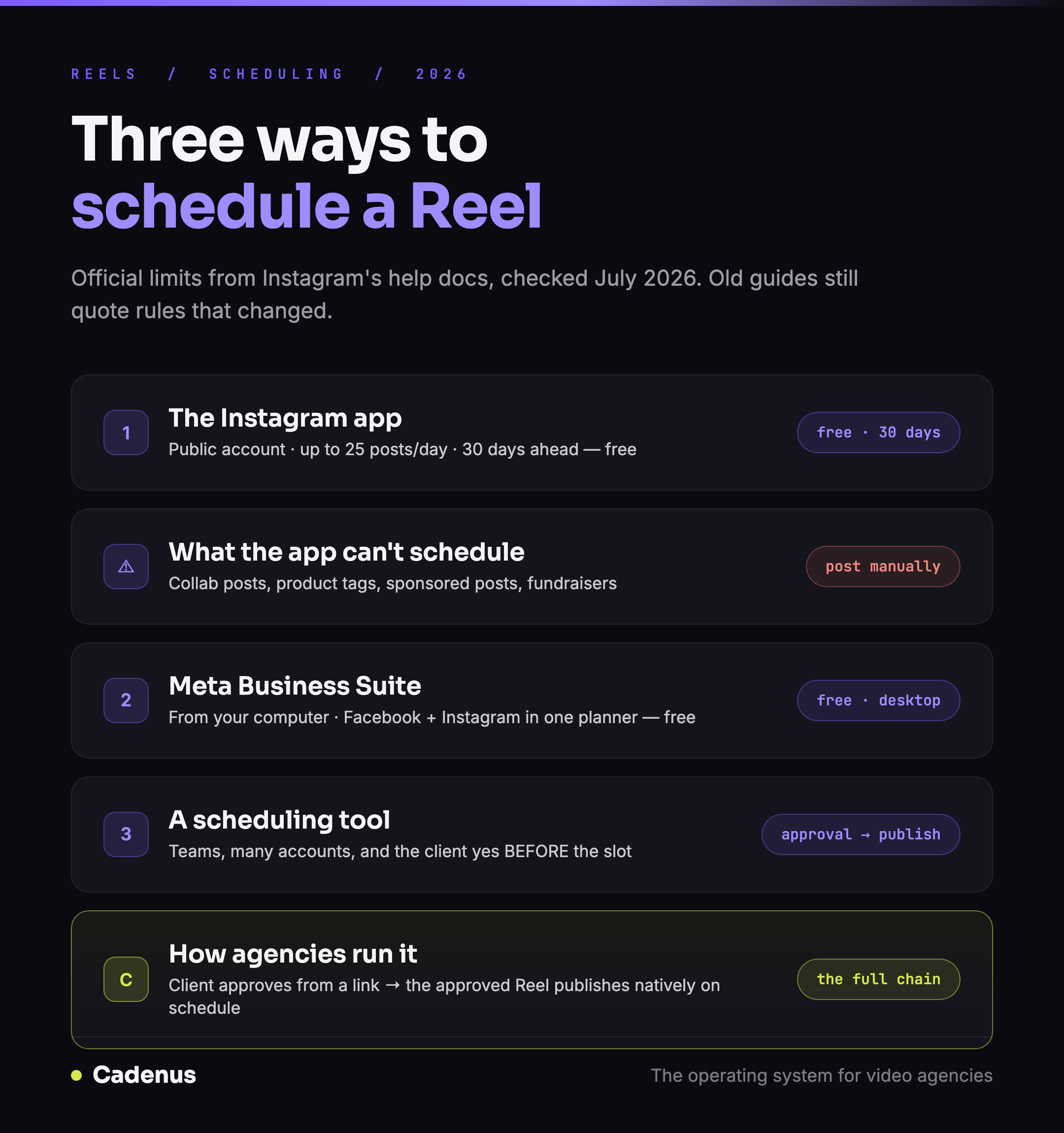 The three ways to schedule Instagram Reels in 2026, with the official limits for each
The quick answer
| Method | Cost | How far ahead | Best for |
|---|---|---|---|
| Instagram app | Free | 30 days, max 25 posts/day | One account, your own content |
| Meta Business Suite | Free | Further out, from desktop | One brand, working from a computer |
| A scheduling tool | Paid | Months | Teams, multiple accounts, client work |
If you post for yourself, the app is enough. Read method 1, skip the rest. If you post for clients, the scheduling is the easy half of your problem, jump to method 3.
Method 1: schedule Reels in the Instagram app
The requirements, per Instagram's help center: a public account, and that's it. The limits: up to 25 scheduled posts a day, up to 30 days in advance.
The steps:
- Tap Create, then Reel.
- Select your video and tap Next.
- Add your caption, effects or filters.
- Tap More options.
- Turn on Schedule this reel and pick a date and time.
- Tap Done, then Back, then Schedule.
To manage what you've scheduled: go to your profile → Menu → Scheduled content. From there you can edit, reschedule, delete, or share any Reel immediately.
One correction to what you may have read elsewhere: older guides say you need a professional (business or creator) account and can schedule 75 days out. Both were true once. As of July 2026, Instagram's documentation says public account, 30 days.
What the app method can't do
Straight from Instagram's documentation: product tagging, collab posts, sponsored posts and fundraisers are not compatible with scheduled content.
The collab restriction hurts the most. Collab posts are a standard growth move, a Reel published jointly with a client, a creator or a partner account reaches both audiences. If your Reel needs a collaborator, you post it manually or use a tool that supports it. Plan for this before you build a content calendar around collabs.
Method 2: Meta Business Suite
If your Instagram account is connected to a Facebook Page, Meta Business Suite lets you schedule Reels from your computer, with a bigger screen, a proper keyboard, and your Facebook and Instagram content in one planner. It is free, and for a single brand run by one person from a desktop, it is often the comfortable middle ground.
Its limits are the ones you'd expect from a free tool built for one brand: no team workflow, no approval step, and switching between many client accounts gets painful fast.
Method 3: a scheduling tool
A paid scheduler earns its price in three situations: you manage several accounts, you work as a team, or someone, usually a client, needs to approve the Reel before it goes live. And if you have heard that posting through a tool gets your Reels throttled, it does not, we went through what Instagram and Meta actually say about schedulers and reach.
That last one is the detail agency guides skip. For client work, scheduling is the last step of a longer chain: the Reel gets edited, the client sees it, the client says yes, and the yes gets recorded, then the Reel deserves a slot on the calendar. A scheduler that starts at the calendar leaves you running that approval chain over email.
This is the order of operations Cadenus is built around: the client approves the Reel from a magic link, no account needed, every decision recorded, and the approved Reel publishes natively to Instagram at its scheduled time, alongside TikTok, YouTube and the rest. For choosing among schedulers, we compared the field honestly in the best social media scheduler for agencies.
Why can't I schedule my Reel?
The checklist, most common cause first:
- Your account isn't public. Instagram's scheduling requires a public account. Check Settings → Account privacy.
- You're trying to schedule a collab post: not supported. Remove the collaborator or post manually.
- The Reel has product tags: also not supported with scheduling.
- Your app is outdated. Scheduling lives in current app versions; update and retry.
- You've hit the limits: 25 scheduled posts per day, 30 days ahead, per Instagram's documentation.
Which method fits you
A creator posting your own Reels: the app. Free, 30 days is plenty, and you keep full access to trending audio while you create. A single brand, planned from a desktop: Meta Business Suite. An agency posting for clients: a tool, not for the scheduling itself, but for everything scheduling depends on: the approval before the slot, the record of who said yes, and publishing across every client account without logging in and out. That full chain is what we build, here is how it runs.
FAQ
Can you schedule Reels on Instagram?
Yes, natively and for free. Public Instagram accounts can schedule Reels, photos and carousels straight from the Instagram app, up to 25 posts a day, up to 30 days in advance, per Instagram's help documentation.
How far in advance can you schedule Instagram Reels?
30 days in the Instagram app, with a limit of 25 scheduled posts per day. Scheduling tools go further, most let you plan months ahead, which matters when you plan content in monthly batches.
Why is the schedule option not showing on my Instagram?
The most common reason: your account isn't public, Instagram's scheduling requires a public account. Also check that your app is updated. And note what can't be scheduled at all: collab posts, product tagging, sponsored posts and fundraisers are not compatible with scheduling.
Can you schedule Instagram Reels for free?
Yes, two ways: in the Instagram app (public accounts, up to 30 days ahead) and in Meta Business Suite from your computer. Paid schedulers earn their price when you manage several accounts, work as a team, or need a client to approve Reels before they go live.
How do agencies schedule client Reels?
The scheduling is the easy half. The hard half is the yes before it: a client should approve the Reel before it gets a slot. Agency tools like Cadenus run that order of operations, the client approves from a link, and the approved Reel publishes natively at its scheduled time.
Sources
- Official limits and steps: How to create and manage scheduled posts and Reels on Instagram, Instagram Help Center, checked July 2026.
- The Reel itself, spec'd right: Instagram Reels size and dimensions
- Choosing the tool: The best social media scheduler for agencies