By Cadenus
On this page
Every agency we have talked to runs some version of the same spreadsheet: a content calendar, hand-built, holding the month together. This is that spreadsheet, built properly, plus the part almost every template skips and almost every agency needs: a client approval workflow, with statuses, a sign-off record and a version log. Free, no account; it works in Google Sheets and Excel.
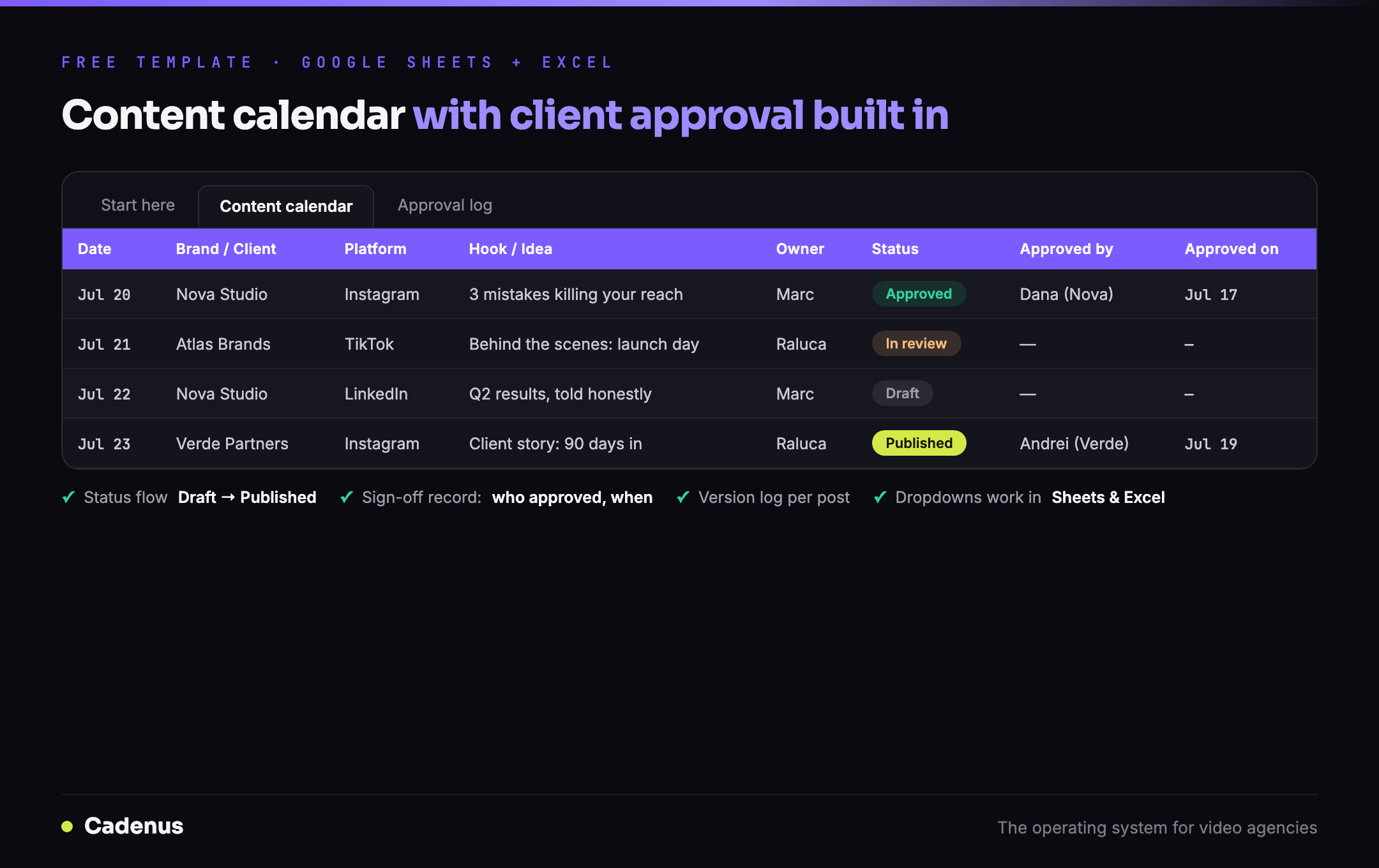 The Cadenus social media content calendar template: calendar with approval statuses, sign-off columns and a version log
What's inside the template
Three tabs, each with a job:
| Tab | What it does |
|---|---|
| Content calendar | One row per post: date, brand/client, platform, format, hook, caption, asset link, owner, plus a status dropdown (Draft → In review → Approved → Scheduled → Published) that color-codes itself |
| Approval log | The audit trail: every version sent for review, who it went to, what came back, when. The tab that ends "we never approved this" |
| Start here | One page of instructions your team will actually read |
The sample rows show the intended rhythm: a post moves through statuses as the work happens, and the moment a client says yes, Approved by and Approved on get filled in. Two cells, thirty seconds, and a record.
Why the approval columns are the point
There are hundreds of content calendar templates. What agencies actually lose sleep over is not the calendar, it's the approvals around it. The pattern comes up in almost identical words wherever agency people compare notes: sign-offs lost in inboxes, clients disputing what they approved, no record of who said yes to what, and when.
A calendar without an approval trail documents your plan. A calendar with one documents your agreement, and the difference shows up precisely on the day a published post gets questioned. That is why the status flow, the sign-off columns and the approval log are not extras here; they are the template.
How to use it in Google Sheets or Excel
Google Sheets: upload the .xlsx to Google Drive and open it, it converts automatically, dropdowns included. Share it with your client the way you already share documents; the statuses and sign-off columns do the rest.
Excel: it just opens. The status dropdowns, color coding and both tabs work natively.
One habit makes the whole system stick: nothing gets scheduled until its row says Approved, with a name and a date next to it. Adopt that single rule and the template pays for itself the first time a client asks "who approved this?", because the answer is a cell, not an argument.
The honest limits of a spreadsheet
This template fixes the record-keeping. It cannot fix the workflow around it: you will still paste captions into a scheduler by hand, chase the client's yes by email, and update statuses yourself. At a handful of clients that is annoying; at ten it is a part-time job.
That loop, send for review, get a recorded approval, publish natively, without the copy-paste, is exactly what Cadenus automates: clients approve from a magic link (no account, no seat), every decision is recorded automatically, and approved posts publish natively to Instagram, TikTok, YouTube, Facebook, X and LinkedIn. The spreadsheet is the manual version of the system; when it starts feeling like a job, the automatic version is a 7-day trial away.
For the thinking behind the workflow itself, read the client approval workflow that ends revision chaos, the template implements exactly that four-rule system.
FAQ
Is this content calendar template really free?
Yes, no account, no card. Leave your email and we send the spreadsheet (.xlsx) straight to your inbox. It opens in Excel and converts automatically in Google Sheets, dropdowns included.
What makes this different from other social media calendar templates?
The client approval workflow. Alongside the usual calendar columns it has a status flow (Draft → In review → Approved → Scheduled → Published), Approved-by and Approved-on fields, and a separate approval log that records every version sent and every decision, so there is never a dispute about what was signed off, when, and by whom.
Does the template work in Google Sheets?
Yes. Upload the .xlsx to Google Drive and open it, it converts automatically, including the status and platform dropdowns. It also works natively in Excel.
Who is this content calendar template for?
Agencies and freelancers managing content for clients, anyone who needs the client to see, comment on and approve a month of posts before anything goes live. For a single brand posting its own content, it works too; the approval columns just become your internal review.
What happens when I outgrow the spreadsheet?
The template's limits are honest: you still copy captions into a scheduler, chase approvals by email and update statuses by hand. That loop is exactly what Cadenus automates, clients approve from a magic link with every sign-off recorded, and approved posts publish natively. The spreadsheet is the manual version of the system.
Sources
- The workflow the template implements: The client approval workflow that ends revision chaos
- Choosing the system around the calendar: Best social media scheduler for agencies · Video production workflow software